

During the recent Black Friday sales I managed to purchase myself a UniFi Dream Machine Pro. I figured with the savings, it would be a good excuse to grab one and start playing with the UniFi ecosystem.
After purchasing the enterprise-grade router and installing it on my rack I very quickly ran into some problems during the setup. While I am not 100% certain on the cause of the issues, I hope this write-up may help someone else who finds themselves in my particular predicament.
Error
The initial setup of the UDM-Pro is very simple. You plug it into the wall and then you watch the little display on the front do it’s thing until it prompts you for what to do next.
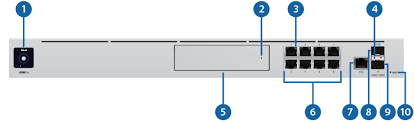
At some point, the display will inform you that you can continue setup via the mobile app. When trying to setup the UDM-Pro on the app it would ask me to login, connect to the device, perform a speed test, and then attempt to finish setting up the device. After a few seconds of setup the app state that the setup process was disrupted.
“Okay”, I thought. Perhaps their mobile app is a little janky. So I plugged my PC into one of the LAN ports and navigated my browser to http://192.168.1.1 to attempt to setup the device directly. While working with the device directly in my browser, the setup was more-or-less the same: login with my UniFi account, perform a speed test, and then attempt to finish setting up the device. Unfortunately, after a few seconds of setup I would see an error message that was even less helpful:
“An unexpected error has occurred during setup”.
The Solution?
To cut right to the chase, I managed to eventually setup my device successfully after changing my UniFi password. Again, I’m not 100% certain if this is the exact solution but I do know that after some troubleshooting this seemed to be the only thing that helped me move my setup forward.
I use 1password as my password manager and I had chosen a random password for my UniFi account. A random password consisting of the maximum number of characters in the password generator: 100.
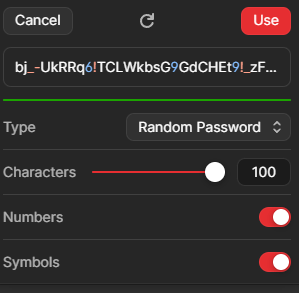
Perhaps having a long password causes something funky to happen in the backend. This wouldn’t surprise me as I have worked with a number of services before that seem to behave unexpectedly when I use ridiculously long passwords like that. If you’re curious about my troubleshooting process, feel free to keep reading.
Troubleshooting
After setup failures on mobile and browser, I did the first thing any reasonable person would do and went to google to see if anyone else had experienced this setup issue before. Many people seemed to have experience some kind of setup issues before and in many of the threads I saw people recommending SSH’ing into the device and manually updating the firmware. So I decided to give this a shot.
Using my PC that was connected to one of the LAN ports, I opened my terminal and SSH’d into my the device:
ssh root@192.168.1.1
password: ui
root@192.168.1.1's password:
Linux UDM-Pro 4.19.152-ui-alpine #4.19.152 SMP Fri Jul 21 21:48:08 CST 2023 aarch64

Firmware version: v3.1.15

  ___ ___      .__________.__
 |   |   |____ |__\_  ____/__|
 |   |   /    \|  ||  __) |  |   (c) 2010-2023
 |   |  |   |  \  ||  \   |  |   Ubiquiti Inc.
 |______|___|  /__||__/   |__|
            |_/                  https://www.ui.com

      Welcome to UniFi Dream Machine Pro!

********************************* NOTICE **********************************
* By logging in to, accessing, or using any Ubiquiti product, you are     *
* signifying that you have read our Terms of Service (ToS) and End User   *
* License Agreement (EULA), understand their terms, and agree to be       *
* fully bound to them. The use of CLI (Command Line Interface) can        *
* potentially harm Ubiquiti devices and result in lost access to them and *
* their data. By proceeding, you acknowledge that the use of CLI to       *
* modify device(s) outside of their normal operational scope, or in any   *
* manner inconsistent with the ToS or EULA, will permanently and          *
* irrevocably void any applicable warranty.                               *
***************************************************************************
During this time, the latest version of UniFi was 3.2.7. I was able to find this on their releases page:
https://community.ui.com/releases/UniFi-OS-Dream-Machines-3-2-7/251dfc1e-f4dd-4264-a080-3be9d8b9e02b
You can easily update your UniFi device using some of their built in tools. Here’s a quick list of other useful commands that you may find useful for UniFi devices: https://www.reddit.com/r/Ubiquiti/comments/k2g8sk/some_useful_udmudmp_ssh_commands/
I initiated a firmware update with the following (change the download link to use http):
ubnt-systool fwupdate http://fw-download.ubnt.com/data/unifi-dream/41ed-UDMPRO-3.2.7-44be94aa-87f0-4012-8f3a-008b345d5ed1.bin
My device managed to successfully update to 3.2.7, however, I was still getting those same errors during setup. I then factory reset the device and nothing seemed to be getting me past the same error.
Finally I noticed that in the browser you can skip the login portion of the setup process. Wanting to try something new, I gave this a shot and quickly noticed that the device managed to setup without any issues. I was able to login and access the UDM-Pro on my mobile and access it fine in the browser. This was strange given that the firmware and everything was exactly the same, I just wasn’t logged in. This made me think that something was wrong with my account.
To test this theory, I factory reset the UDM-Pro again and tried to do the setup by logging in. The same error occurred again. I then navigated to UniFi’s website and decided to change my password to something more reasonable that was not 100 characters in size. After shortening my password and going back to my UDM-Pro and logging in, the setup process was successful!
Conclusion
Again, while I am not 100% certain if the problem was because of my password or if the series of events that took place was purely coincidence, I do think it is helpful to share my experience. This problem was so obscure that I hope this post may be able to help the 1 or 2 other people in the world who may also run into it and be unsure of what to try.
Liked this post?
If you liked this post, consider buying me a cup of coffee!


 Testing On Prod