

If you and your buddies have been playing on the steam version of Palworld and want to transfer your world to a dedicated server, this is the guide for you. It’s actually really simple, but be warned that you will only be able to transfer the world and other player’s data. You will not be able to transfer the host’s player data. A method for this has yet to be identified, but if you find a way please comment below!
How to create a dedicated server
Luckily Palworld already supplies an official guide for how to do this. Their guide is hosted here: https://tech.palworldgame.com/dedicated-server-guide
For this post, I will be using their “Linux – SteamCMD” setup on an Ubuntu Server 20.04 box.
Locate Files
Assuming that you had created a multiplayer session using the built-in server, you should be able to identify that world’s files here:
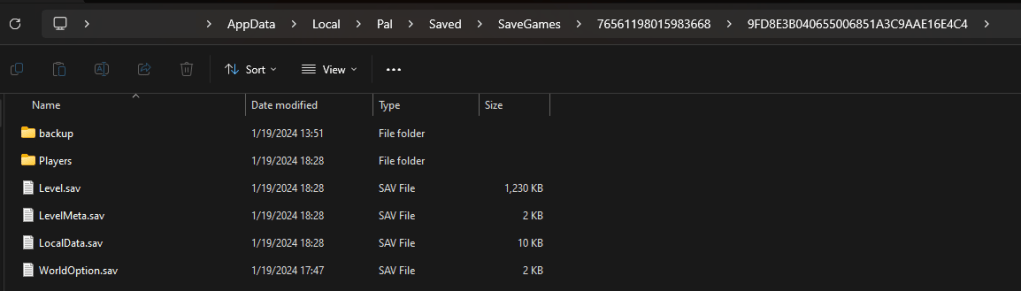
C:\Users\<USERNAME>\AppData\Local\Pal\Saved\SaveGames\<HASH>\9FD8E3B040655006851A3C9AAE16E4C4\
The <USERNAME> and <HASH> may differ for you, but you should be able to identify the 9FD8E3B040655006851A3C9AAE16E4C4. Your directory should look something like this:
Transfer Files
On your box that is hosting your dedicated server, you will want to identify the following location:
<PATH_TO>/Steam/steamapps/common/PalServer/Pal/Saved/SaveGames/0/458AD0724B084DF5BF6621D3EE02F7D8
If you don’t see this directory then you may need to run the server at least once and turn it back off. This should generate this path.
All you need to do is transfer all the files from
C:\Users\<USERNAME>\AppData\Local\Pal\Saved\SaveGames\<HASH>\9FD8E3B040655006851A3C9AAE16E4C4\
to
<PATH_TO>/Steam/steamapps/common/PalServer/Pal/Saved/SaveGames/0/458AD0724B084DF5BF6621D3EE02F7D8
and you will be good to go!
Problems
While this will successfully transfer all player and world data to the dedicated server, I was unable to identify a way to transfer the host’s player data to the dedicated server.
I did perform a surface level investigation and I can see player data being generated for my local player, however, I have not found a way to get the dedicated server to associate me with that data. Perhaps if myself or someone else in the community can find a way to parse Palworld’s player.sav files we may be able to identify how to remedy this problem.
If anyone finds a solution to this, please drop a comment! I’d love to hear what others have tried.
Liked this post?
If you liked this post, consider buying me a cup of coffee!



Hi,
this seems to work:
LikeLike